# Proofi
Identification for DeFi
Proofi unburdens DeFi projects with the complexity of having to comply with KYC regulations.
> *You don’t need to store the client’s home address or maiden name.*
>
> *You only need to know if the person is **legally permitted** to participate in your project.*
Normally, a project needs personal information to match it against a set of requirements to ensure a wallet holder is allowed to participate. With Proofi, the project makes these requirements public, entrusting identity providers to take care of the verification.
The verification process only returns *true* or *false*, not revealing any personal data. Each verification response is timestamped, signed, and anchored.
## Regulatory compliance
In case a regulatory authority formally requests a participant's information, the project is able to rely on the identity provider to supply the necessary information.\
\
This allows projects to comply with increasingly strict regulations while safeguarding users' private data.
{% hint style="warning" %}
Always get legal advice from a legal professional within your jurisdiction. Identity providers can only operate within the boundaries of a project's terms and conditions. And only if a participant has formally agreed to those terms.
{% endhint %}
## Identity providers
Proofi has a closed trust network of identity providers. All identity providers are required to operate in the same way to ensure a project is able to comply with local regulations regardless of the chosen provider.
It's always up to the project to choose which identity providers it entrusts (opt-int). Accepting more providers means more users are able to skip the KYC procedure during the onboarding procedure. However, the project must ensure that there's no conflict between the jurisdiction of the DeFi project and that of the identity provider.
The project chooses a default identity provider. In case the wallet owner is not known to any of the trusted providers, the user will go through the KYC procedure of the default provider.
{% hint style="info" %}
While Proofi is in public beta, the only available identity provider is [proofi.com](https://proofi.com).
{% endhint %}
# Signing up
## Create an account
In order to start interacting with Proofi you need to first create an account. Visit the [Proofi app](https://app.proofi.com/) and create an account. An email will be sent for verification.
\
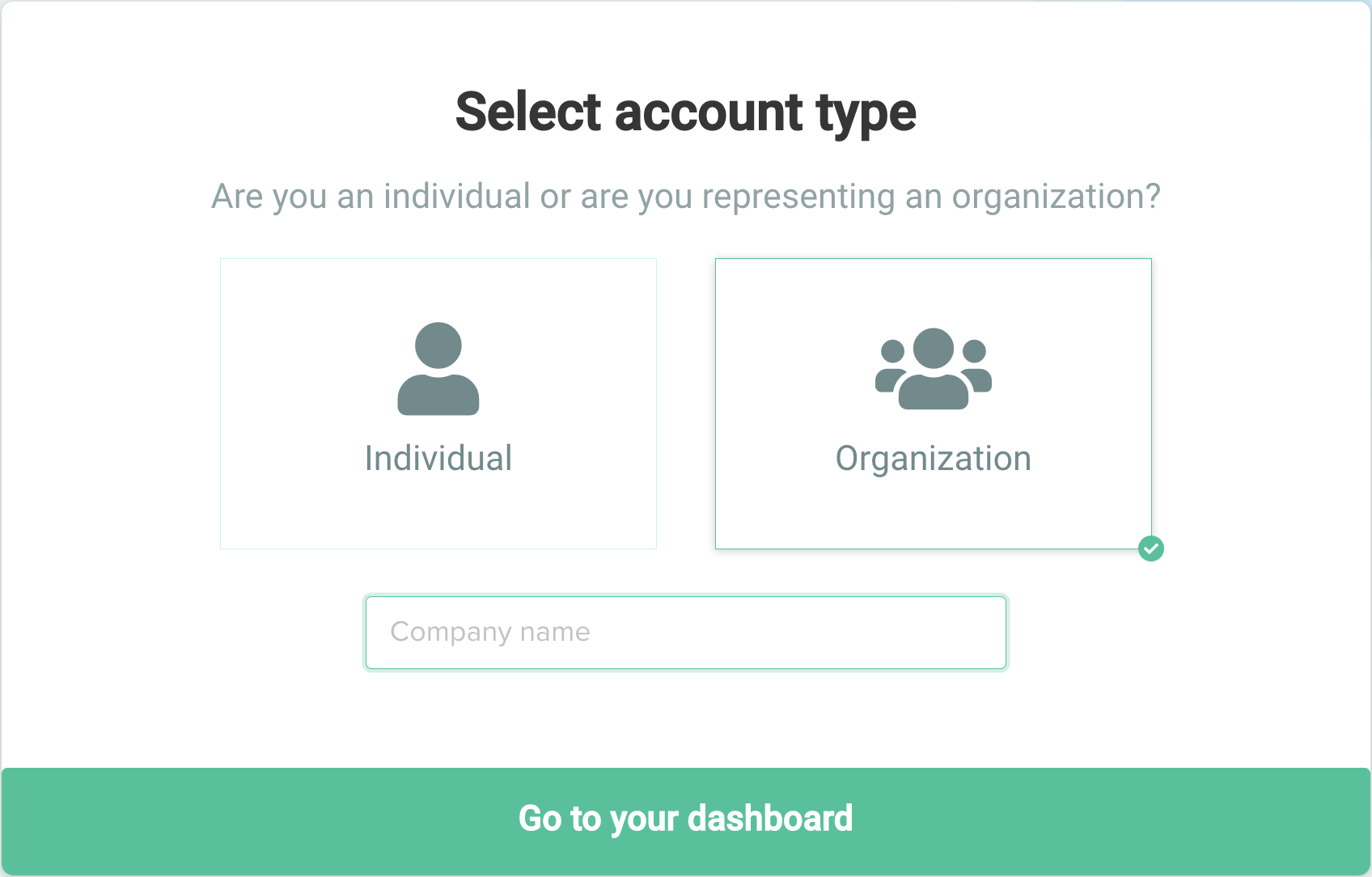
After opening the link you will have to retype your password and choose between an individual or an organization account type.
If you want to create a project you have to select ***Organization***
Enter your company name and proceed to the dashboard.
## Add verification method
In order to be able to connect your Metamask address with Proofi you will need to add a verification method.\
\
To do so click on the ***Add Verification Method*** button in the did section of the dashboard
You will be requested to sign a message using Metamask or in the future with the LTO Wallet
Await until you are informed that the verification method has been successfully added
{% hint style="info" %}
To add a project, the Metamask address used to add a verification method must match the owner of the smart contract.
{% endhint %}
### Troubleshooting
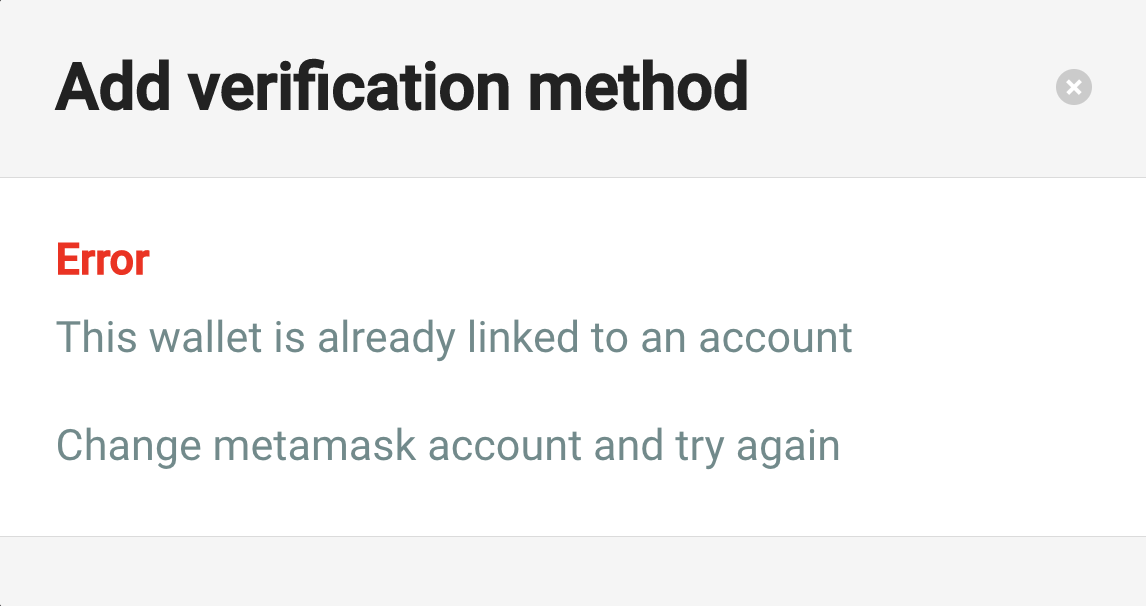
Your Metamask address cannot be associated with more than one Proofi account.
If this screen appears it means that your current Metamask address has been already associated with a Proofi account. Change the Metamask account and try again.
{% hint style="info" %}
You are now ready to deploy your project on Testnet. To deploy on Mainnet follow these [additional instructions ](/going-live)
{% endhint %}
# Creating a project
To create a project simply go to the dashboard from an Organization account and on the left side menu you will see the Projects menu
Click on Add project and the menu for creating a project will appear

You can now enter the project name and the necessary requirements to set up the project.
### Setting requirements
Different projects have different requirements, for now, it is possible to specify
* Excluded countries
* Minimum age
* Single wallet
{% hint style="success" %}
The options for requirements are limited in the beta version. The team will add custom requirements for a project on request. If the presented options don't meet your needs please contact us via [support@proofi.com](email:support@proofi.com).
{% endhint %}
#### Excluded countries
Selecting one or more countries from the excluded countries list will prevent users with a nationality of those countries to participate in the project
#### Minimum age
Indicates the minimum requested age to be able to participate in the project.
#### Single wallet option
The single wallet option makes the project available to just one wallet address per user. A user will not be able to participate more than once using different wallet addresses.
### Smart contract address
The smart contract address allows the project to be linked with a smart contract. The smart contract, which must implement the [OpenZeppelin ownable interface](https://github.com/OpenZeppelin/openzeppelin-contracts/blob/master/contracts/access/Ownable.sol), will then be able to verify if a user is suitable to participate in querying this information through a ChainLink oracle.
{% hint style="warning" %}
It's not possible to modify requirements for an existing project. However, you're able to deactivate the project and create a new one for the same smart contract.
{% endhint %}
### Finishing the project setup
Once all the parameters are set, you can submit.
\
If you have added a smart contract address you will have to sign with your Metamask account to verify the ownership of the smart contract.
Once submitted you will see the new project added to the project's dashboard.
### Troubleshooting
In order to successfully link a smart contract address with your project you need to:
* select the correct network
* make sure that you are using the right contract address
* the Metamask account you are using corresponds to the address of the owner of the smart contract.
# Integration
In order to integrate your website with Proofi you will need a [smart contract](#smart-contract) and a [website](/integration/website).
The smart contract will allow you to query information and verify the eligibility of the user to participate in the project.\
\
The website will take care of the integration with Proofi and the smart contract.
{% hint style="info" %}
Check out our [Github repo](https://github.com/ltonetwork/krazy-kobe-nft) for detailed implementation information
{% endhint %}
# Website
The actual verification process will happen through your smart contract. However some logic must be done by the website that connects to the web3 (Metamask, etc) wallet.
## Is known?
To prevent executing calls that can't be processed and wasting users' gas fees, the website should check if the wallet is known by the identity provider.
{% hint style="info" %}
Each identity provider will deploy a smart contract on each network they support. During the beta, proofi.com is the only available provider. It has published the following contracts:
```
ethereum = "0x11B42Ca67d52Ef145b5b84Ba042a1859C8aeb376"
goerli = "0xbBA38836dca7173a4B66D24E48dd0993b0d9Bf17"
```
Other networks can be supported on request. Please send an email to .
{% endhint %}
Get the user's wallet address from the web3 wallet and call the `isKnown()` function on the contract. This is an external view function, calling it doesn't cost any gas.
```javascript
const provider = new ethers.providers.Web3Provider(window.ethereum, "any");
const address = await provider.getSigner().getAddress();
const identityProviderContract = new ethers.Contract("0xbBA38836dca7173a4B66D24E48dd0993b0d9Bf17", abi, provider);
if (await identityProviderContract.isKnown(address)) {
mint();
} else {
redirectToProofi();
}
```
If the `isKnown()` function returns true, continue with the call to the smart contract. If the address is not known, the user should be redirected to Proofi.
## Redirection to Proofi
Users that have never gone through a KYC process with one of the identity providers should be redirected to Proofi.
They will be led through a simple and streamlined procedure, after which they are redirected back to your website.
```javascript
window.location.href = `https://app.proofi.com/accounts/participate?redirectUrl=
${encodeURIComponent(window.location.href)}&network=testnet`;
```
The `redirectUrl` parameter is set to the current page. Once the user is finished, they will be sent back to the specific page he/she left from.
## Example
Krazy Kobe is a demo project where NFTs can only be minted by approved wallet owners.
Have a look at the [JavaScript code](https://github.com/ltonetwork/krazy-kobe-nft/tree/main/website) of the website in the repository.
# Smart contract
Verification can be done directly from the smart contract using [Chainlink Any API](https://docs.chain.link/any-api/introduction). This means that you don't need to setup any backend service.
## Installation
Proofi supplies a solidity library for easy integration. It can be installed using NPM
```
npm install --save @proofi/solidity
```
## Usage
The smart contract must implement the [OpenZeppelin Ownable interface](https://github.com/OpenZeppelin/openzeppelin-contracts/blob/master/contracts/access/Ownable.sol) in addition to the Proofi Verification interface.
Use the Verification base contract of the Proofi library to implement all required logic, including calls through Chainlink Any API.
```solidity
pragma solidity ^0.8.0;
import "@openzeppelin/contracts/access/Ownable.sol";
import "@openzeppelin/contracts/token/ERC721/ERC721.sol";
import "@proofi/solidity/Verification.sol";
// This demo is an NFT that can only be minted by verified wallets.
// Minted NFTs are initially locked and unlocked on verification.
contract MyNFT is ERC721, Ownable, Verification {
// ...
}
```
{% hint style="info" %}
In this example, we're using an NFT contract. But the Verification class can be used for any type of smart contract.
{% endhint %}
### Verification
Before a wallet is allowed to participate and interact with a smart contract (mint, swap, etc) it should be verified with an identity provider.
The website that's connected with Metamask, should have checked that the wallet is known to the identity provider using the `isKnown()` call, submitting a call to your smart contract.
When using the `Verification` class, the smart contract will keep a list of approved and declined wallet addresses. If the wallet is in neither of these lists call `verify()`, passing the message sending.
```javascript
// When a token is minted verify it using the IdentityProvider.
// The token is reserved until verification is complete.
function mint(uint256 id) public {
require(isMinted(id) == State.AVAILABLE, "token unavailable");
require(!isDeclined(msg.sender), "wallet is declined");
if (isApproved(msg.sender)) {
_safeMint(msg.sender, id);
} else {
verify(msg.sender);
_reserve(msg.sender, id);
}
}
```
Verification is asynchronous. The Chainlink Any API request is an EVM event that's picked up by a Chainlink Oracle. This oracle does an HTTP request to the Proofi API and publishes the yes/no answer on the blockchain.
{% hint style="warning" %}
If the `verify()` function is called with a different address than the message sender, Proofi will likely refuse to give a response. Proofi checks the blockchain transaction to ensure that the wallet owner is knowingly participating in the project.
{% endhint %}
### Hooks
There are two hooks that should be implemented in your smart contract: `onApproved` and `onDenied`. One of these functions will be called based on the response of the oracle.
```solidity
// Hook from approved verification: unlock the tokens
function onApproved(address owner) internal override {
mintReserved(owner);
}
// Hook from denied verification
function onDenied(address owner) internal override {
cancelReservations(owner);
}
```
## Chainlink
There are costs involved in doing ChainLink Any API calls. Fees for these calls need to be paid in LINK tokens. For testnet these tokens can be obtained from the [Chainlink faucet](https://faucets.chain.link/goerli).
Costs differ per Oracle and network. You're free to use any Oracle you like, as long as it supports the `Get > Bool` job. If you're unsure which oracle to use, have a look at [Translucent](https://github.com/translucent-link/chainlink-node-jobs/tree/main).
{% hint style="warning" %}
To use Chainlink, you must transfer LINK tokens to your smart contract. You will not be able to transfer them back unless you add this functionality to your contract.
{% endhint %}
### Example configuration
```json
{
"goerli": {
"url": "https://app.proofi.com/api/verify/eip155:5/",
"token": "0x326C977E6efc84E512bB9C30f76E30c160eD06FB",
"oracle": "0xCC79157eb46F5624204f47AB42b3906cAA40eaB7",
"jobId": "0xc1c5e92880894eb6b27d3cae19670aa3"
}
}
```
## Example
Krazy Kobe is a demo project where NFTs can only be minted by approved wallet owners.
Have a look at the [solidity code in the repository](https://github.com/ltonetwork/krazy-kobe-nft/tree/main/solidity) or find the project on [Etherscan](https://goerli.etherscan.io/address/0xA7EE0572b72f43d39B7C863Ba9831A8291e8a9b4).
# OpenID
ChainLink AnyApi allows wallet verification directly from the smart contract. However, if you do not want or are unable to use ChainLink AnyApi, you query from a backend service instead.
Normally, Proofi uses blockchain events to verify that a wallet is trying to participate in a project. To query from a backend, the wallet owner first needs to approve the project by connecting through OpenID.
{% hint style="danger" %}
OpenID is not available by default in the beta version. If you're interested in using OpenID please contact [support@proofi.com](email:support@proofi.com).
{% endhint %}
# Going live
Unapproved organizations can only use Proofi on Goerli, the Ethereum testnet. Organization approval ensures that the legal entity behind a project is known to (potential) participators.
{% hint style="success" %}
While Proofi is in beta, there is a manual approval process. If you're ready to move ahead, please contact [support@proofi.com](email:support@proofi.com).
{% endhint %}
# Protocol
## Account verification
`GET` `https://app.proofi.com/api/verify/{blockchain}/{account}`
Verify that a blockchain account is allowed to participate in a project. The response depends on the given API key.
#### Path Parameters
| Name | Type | Description |
| -------------------------------------------- | ------ | -------------------- |
| blockchain\* | String | CAIP-2 blockchain id |
| account\* | String | Blockchain address |
#### Headers
| Name | Type | Description |
| ----------------------------------------------------- | ------ | ------------------------ |
| Auhorizaton: Bearer\* | String | Project specific API key |
{% tabs %}
{% tab title="200: OK Verification response" %}
```javascript
{
"blockchain": "eip155:1",
"address": "0xab16a96d359ec26a11e2c2b3d8f8b8942d5bfcdb"
"state": "final",
"approved": true,
"timestamp": 1644581061214,
"proof": "47pP5r1Kh159XmxcfG2eQVj6dKNhub3mvGgpJovcw7EcZyJswFLYyKGYNV21BGJ8pwkajA75ZLMWFBdv3BzMRMk"
}
```
{% endtab %}
{% endtabs %}
{% hint style="info" %}
[CAIP-2](https://github.com/ChainAgnostic/CAIPs/blob/master/CAIPs/caip-2.md) defines a way to identify a blockchain in a human readably, developer-friendly, and transaction-friendly way.
{% endhint %}
| eip155:1 | Ethereum mainnet |
| --------------------------------------- | ---------------------------- |
| eip155:42 | Kovan: Ethereum test network |
| eip155:56 | Binance smart chain |
| solana:4sGjMW1sUnHzSxGspuhpqLDx6wiyjNtZ | Solana mainnet |
| lto | LTO Network |
### State
The response contains a `state` field, which can be "unknown", "pending", or "final". In case of a final result, the response will contain an `approved` field specifying if the given account should be allowed to participate in accordance with the configured requirements.
### Non-repudiation
A final response contains proof of delivery for additional assurance towards DeFi projects. It allows you to indisputably and independently prove that the information used to allow or reject participation, has been provided by Proofi.
The proof is an ECDSA secp256r1 (aka ECC prime256v1) signature. The signature is based on a binary message
| Field | Type | Bytes |
| ------------------ | ------ | ----- |
| Project id | Binary | 26 |
| Account Length (N) | Short | 2 |
| Account | String | N |
| Allowed | Byte | 1 |
| Timestamp | Long | 8 |
{% hint style="info" %}
The `account` field has the CAIP-10 format, which is `blockchain-id:address`. The address may be normalized.
{% endhint %}
{% hint style="success" %}
The sha256 hash of the signature is also published to LTO Network using an anchor transaction.
{% endhint %}
The public key for verifying the proof of delivery can be obtained from the SSL certificate of app.proofi.com.
### Idem potent
Doing the same request multiple times will give the same response, given that the information associated with the wallet address hasn't changed in the meantime.



 In order to successfully link a smart contract address with your project you need to:
* select the correct network
* make sure that you are using the right contract address
* the Metamask account you are using corresponds to the address of the owner of the smart contract.
# Integration
In order to integrate your website with Proofi you will need a [smart contract](#smart-contract) and a [website](/integration/website).
The smart contract will allow you to query information and verify the eligibility of the user to participate in the project.\
\
The website will take care of the integration with Proofi and the smart contract.
{% hint style="info" %}
Check out our [Github repo](https://github.com/ltonetwork/krazy-kobe-nft) for detailed implementation information
{% endhint %}
# Website
The actual verification process will happen through your smart contract. However some logic must be done by the website that connects to the web3 (Metamask, etc) wallet.
## Is known?
To prevent executing calls that can't be processed and wasting users' gas fees, the website should check if the wallet is known by the identity provider.
{% hint style="info" %}
Each identity provider will deploy a smart contract on each network they support. During the beta, proofi.com is the only available provider. It has published the following contracts:
```
ethereum = "0x11B42Ca67d52Ef145b5b84Ba042a1859C8aeb376"
goerli = "0xbBA38836dca7173a4B66D24E48dd0993b0d9Bf17"
```
Other networks can be supported on request. Please send an email to
In order to successfully link a smart contract address with your project you need to:
* select the correct network
* make sure that you are using the right contract address
* the Metamask account you are using corresponds to the address of the owner of the smart contract.
# Integration
In order to integrate your website with Proofi you will need a [smart contract](#smart-contract) and a [website](/integration/website).
The smart contract will allow you to query information and verify the eligibility of the user to participate in the project.\
\
The website will take care of the integration with Proofi and the smart contract.
{% hint style="info" %}
Check out our [Github repo](https://github.com/ltonetwork/krazy-kobe-nft) for detailed implementation information
{% endhint %}
# Website
The actual verification process will happen through your smart contract. However some logic must be done by the website that connects to the web3 (Metamask, etc) wallet.
## Is known?
To prevent executing calls that can't be processed and wasting users' gas fees, the website should check if the wallet is known by the identity provider.
{% hint style="info" %}
Each identity provider will deploy a smart contract on each network they support. During the beta, proofi.com is the only available provider. It has published the following contracts:
```
ethereum = "0x11B42Ca67d52Ef145b5b84Ba042a1859C8aeb376"
goerli = "0xbBA38836dca7173a4B66D24E48dd0993b0d9Bf17"
```
Other networks can be supported on request. Please send an email to 